How do I make a GIF loop forever?
Open the GIF here, leave Plays on Forever and press Export GIF. The new file is marked to repeat endlessly.
Free · runs in your browser
Open a GIF that stops after one play, set it to loop forever or a set number of times, smooth the restart if it jumps, and save it again.

Or choose one from your computer. You can also start from a video.Pick a GIF from your photos or files. It stays on your phone.
Works with MP4MOVWebMGIFand more
Looped on your device. Nothing is uploaded.
To make a GIF loop forever, open it here, leave Plays on Forever and press Export GIF. The new file carries the instruction to repeat endlessly, so it loops in every browser and app that respects it.
A GIF that plays once and freezes isn’t broken; it is missing that instruction, or the instruction asks for a set number of plays. Some editors and converters leave it out by default. Re-saving the frames with the right setting is the whole fix, and you can also choose Once, ×2, ×3 or ×5 when a GIF should stop on its last frame.
The GIF is processed in your browser and never uploaded. Very old or very large GIFs open fine; the only limit is 30 seconds of animation.
Drop the GIF on the page or press Select video (Choose video on a phone). It is turned into a video for editing, which takes a moment for long GIFs.
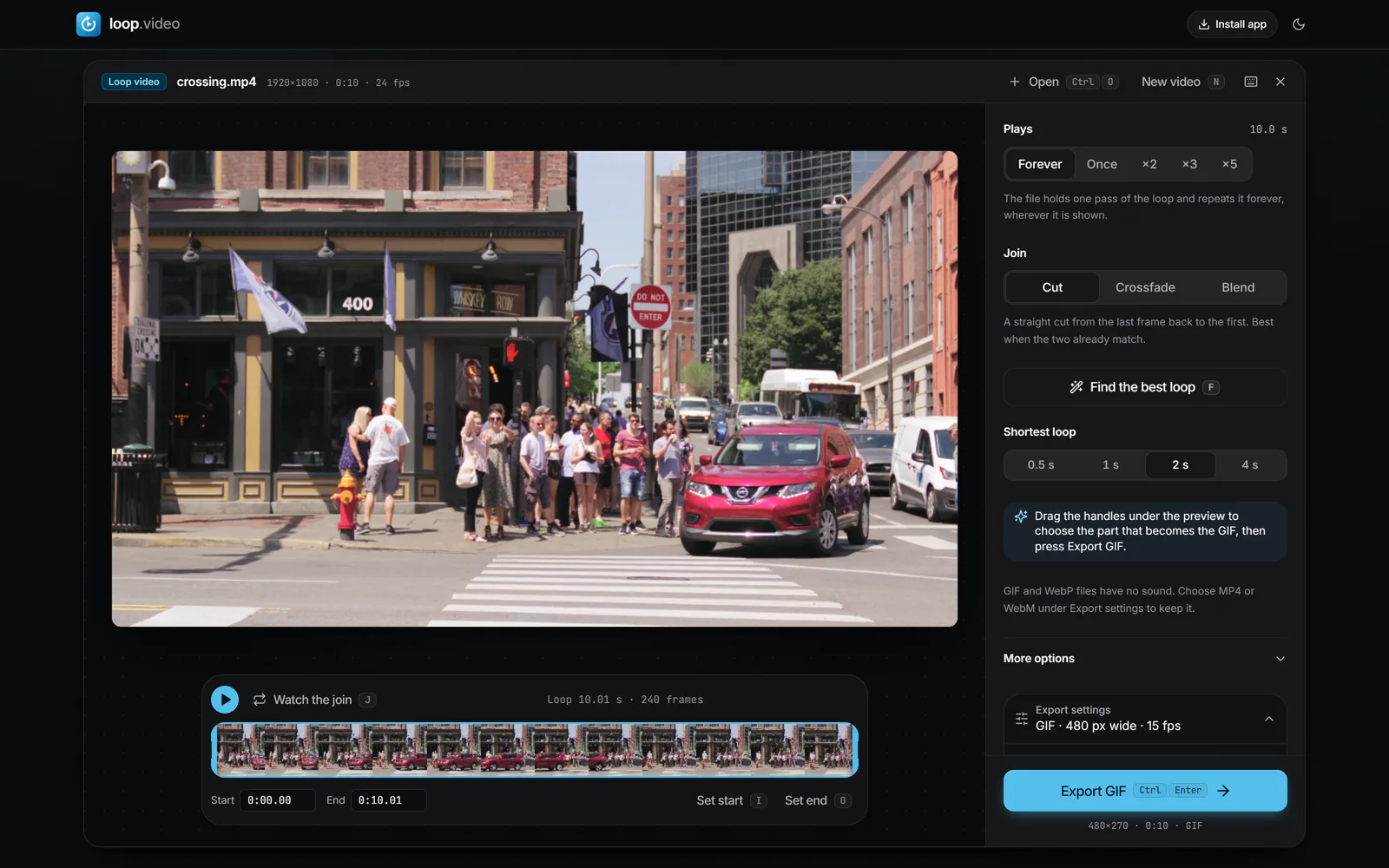
Plays starts on Forever. Choose Once, ×2, ×3 or ×5 if the GIF should stop after a number of plays.
 (enlarge image)
Plays on Forever writes the instruction that makes a GIF repeat endlessly.
Press Watch the join (J) to see the moment the last frame hands back to the first. If it jumps, press Find the best loop (F) or set Join to Crossfade.
In Export settings, pick the Width closest to the GIF’s own and a Frame rate near its speed (most GIFs run at 10 to 15 fps). Set Quality to High to keep the colours close.
Press Export GIF, then Download video to save the new .gif, or Share or save to Photos on a phone.
The original GIF format had no idea of looping. Repeat playback was added later through an extra block of data, known as the NETSCAPE2.0 application extension after the browser that introduced it. That block holds a loop count:
Tools that export GIFs often decide this for you. A GIF saved with looping off, or with a count of one, behaves exactly as told. Plays in loop.video writes the block for you: Forever writes a count of 0, Once leaves the block out, and ×2, ×3 and ×5 write the matching count.
A GIF that loops forever also shows its weakest moment forever: the jump from the last frame back to the first. Many GIFs were cut from a video at an arbitrary point, so that jump is obvious.
A perfect loop is one where the frame after the last would be the first: a rotating object completes its turn, a wave returns to the same shape. The seamless loop guide explains how to shoot and cut for that.
Forever is right for reactions, stickers, website decorations and anything meant to sit on screen. A set count suits other jobs:
Respecting the count is up to the app showing the GIF. Several chat and social apps loop every GIF regardless of what the file says, and a few email clients show only the first frame. Browsers follow the file.
Re-saving a GIF means choosing its colours again. To stay close to the original:
If what you need is a longer piece of animation rather than an endless one, for a platform that wants a video, convert it with GIF to MP4 and repeat it to any length. Starting from a video? The MP4 to GIF converter makes the looping GIF in one go.
Open the GIF here, leave Plays on Forever and press Export GIF. The new file is marked to repeat endlessly.
It has no loop block, or its loop count asks for a single play. Re-save it with Plays set to Forever to fix it.
Choose Once under Plays before exporting. The GIF then plays through one time and stops on its last frame.
Yes. Choose ×3 under Plays. Browsers play it three times in total; some chat apps ignore the count and loop it anyway.
Press Find the best loop to choose matching start and end frames, then Watch the join to check it. If the footage never comes back to where it started, use a short Crossfade.
Slightly, because the colours are chosen again. Keep the Width near the original’s, set Quality to High and leave Dither colours on to keep it close.
No. The GIF is decoded and re-encoded in your browser and never leaves your device.