What is a seamless loop video?
It is a clip whose last frame flows into its first so smoothly that you cannot see where it restarts. Played on repeat, it looks like one continuous piece of footage.
Free · runs in your browser
Let the tool search your clip for the start and end that meet most cleanly, then smooth what is left of the jump with a crossfade or a blend.
To make a seamless loop video, choose a start and an end where the frame after the last one looks almost exactly like the first, then cover any small jump that remains with a short crossfade. In loop.video, Find the best loop searches the clip for that pair of frames and Watch the join plays the restart so you can judge it, all inside your browser.
Whether a loop looks endless depends mostly on the footage. A locked-off camera, movement that returns to where it began and light that stays even will hide the restart; a pan, a passing car or a cloud crossing the sun will give it away. Below you will find how the search rates a join, when each of the three join types is the right call, and how to film clips that loop well in the first place.
Once the join is clean you can repeat it as often as you like, from a handful of plays to a video that runs for an hour. The file never leaves your device, there is no watermark and you do not need an account.
Drag a video onto the page or press Select video (Choose video on a phone). On this page the search starts by itself as soon as the clip has opened, and the join is already set to Crossfade.
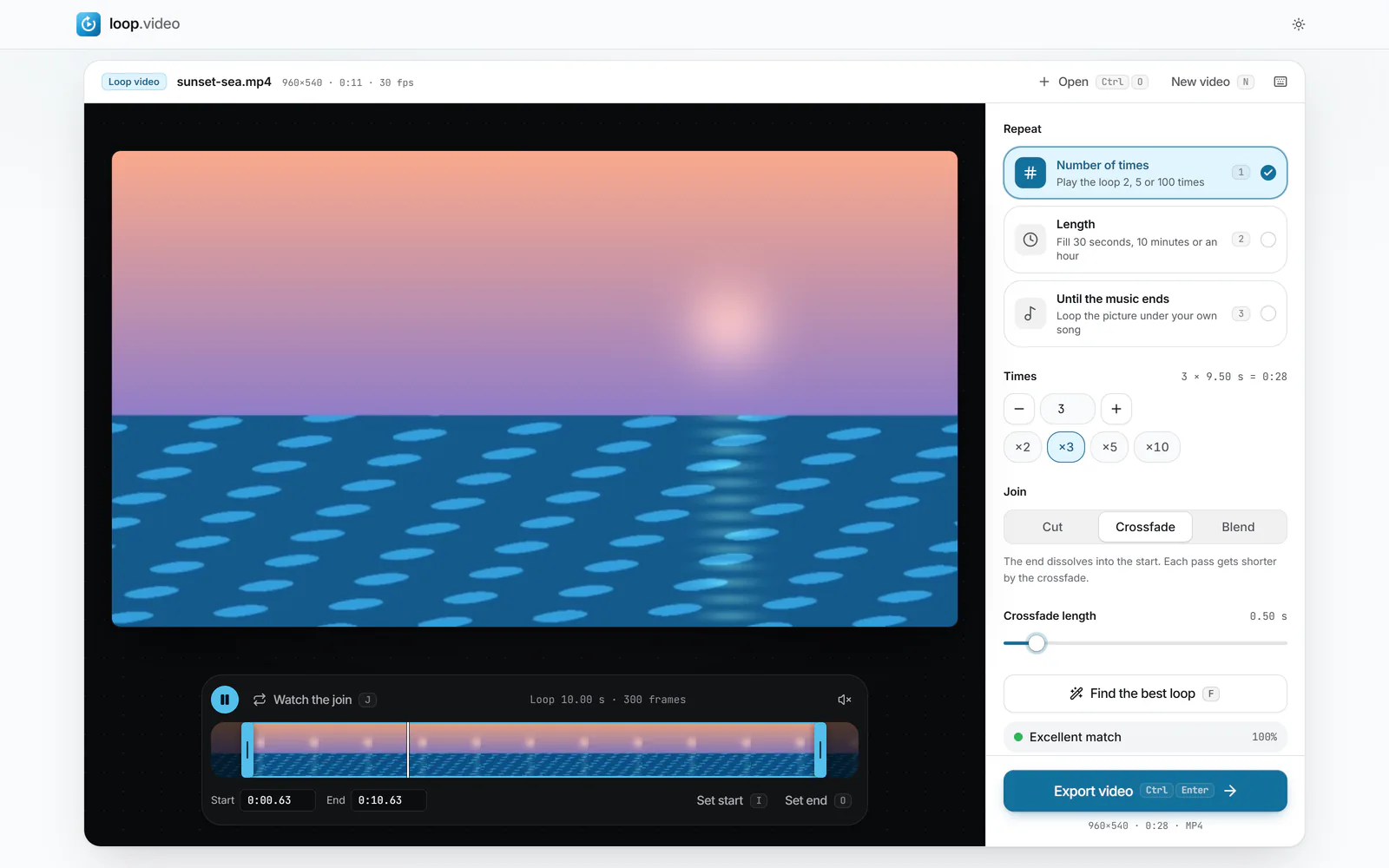
Find the best loop moves the Loop start and Loop end handles to the best pair it found and labels it Excellent match, Good match, Fair match or Poor match with a percentage. If the loop it picked is too short, raise Shortest loop (0.5, 1, 2 or 4 s) and press Find the best loop again (F).
 (enlarge image)
Find the best loop found a 10-second loop and rated it Excellent match.
Press Watch the join (J) to see the exact moment the end runs into the start. To nudge a handle, select it and use the arrow keys for one frame or Shift with an arrow for one second; , and . step the playhead frame by frame.
Under Join, keep Cut when the frames already match, use Crossfade and its Crossfade length slider for a gentle dissolve, or choose Blend with 1 to 6 Blend frames to soften a small jump without shortening the loop.
Under Repeat, pick Number of times, a Length such as 10 min, or Until the music ends. With Sound on Original, leave Smooth the sound at the join switched on so the audio does not click at each restart.
Press Export video (Ctrl or Cmd+Enter). When Your video is ready appears, press Download video, or Change loop to go back and adjust it.
Your eye notices a loop at the instant something changes faster than it should. If the frame that follows the last one is only as different from it as any two neighbouring frames, nobody can tell where the clip begins. Four things decide whether that happens.
The picture at the end has to be close to the picture at the start: the same leaves in the same places, the same wave about to break, the same flicker of a flame. Repetitive motion such as a spinning fan, steady rain or a ticking pendulum gives you many near-identical moments to choose from.
Two frames can look alike while things in them move in opposite directions. A swing at the top of its arc looks the same on the way up and the way down, and joining those two moments makes it stop and turn round. A good join matches the frames just before and just after as well, so motion carries straight on.
Handheld drift and slow pans are the most common reason a loop jumps. Even a few pixels of shift between the end and the start makes the whole frame twitch at the restart. A tripod, or resting the phone on something solid, removes the problem at the source.
Brightness that creeps up or down across the clip, from a cloud, a sunset or the camera adjusting its own exposure, produces a visible step at the join even when the motion lines up. Lock exposure if your camera allows it, and avoid shooting as the light is changing.
The search looks at a spread of frames from the whole clip, shrunk to a tiny grid of brightness values. For every possible pair of start and end it measures how far the frame after the end differs from the start frame, and it also compares the frames on either side of the join so that motion has to agree in direction. It then checks the frames close to the winning pair one by one, so the handles land on exact frames rather than on the nearest sampled one.
Rather than using a fixed threshold, the score is measured against the clip itself. The tool works out how much a typical frame differs from the next in your footage and asks how big the jump at the join is compared with that ordinary step. A busy scene with rippling water can hide a bigger jump than a still interior can, and the rating reflects that.
The percentage tells the same story on a finer scale: it is 100 when the join is no bigger than an ordinary frame step and falls as the jump grows. Among joins that score equally well, the search prefers the longer loop, and Shortest loop stops it from settling on a tiny fragment.
Know its limits. It compares brightness patterns, so a change in colour alone barely registers, and fine detail is averaged away in such a small grid. It also cannot invent a loop in footage that never returns to a similar state, such as someone walking out of shot. Treat the rating as a strong hint and let Watch the join have the final word.
A practical order: run the search, try Cut and watch the join; if you see a flick, try Blend at two or three frames; if that is not enough, switch to Crossfade and lengthen it until the jump turns into a gentle dissolve.
For long calming loops of a fire, rain or the sea, the ambient video loop page goes further into what makes footage relaxing to watch on repeat.
Audio gives a loop away faster than pictures do. A sudden cut in the waveform produces a click, and a sound that stops mid-word or mid-note announces the restart even if the image is perfect.
It is a clip whose last frame flows into its first so smoothly that you cannot see where it restarts. Played on repeat, it looks like one continuous piece of footage.
Open the clip in loop.video and press Find the best loop (F). It compares frames across the whole clip, moves the handles to the start and end that meet most cleanly and rates the match. You can then fine-tune either handle one frame at a time with the arrow keys.
Usually the camera moved or the light changed during the clip, so no two moments truly match. Switch the join to Crossfade, lengthen it until the jump becomes a dissolve, or film the scene again on a tripod.
Each pass of the loop is shorter by the crossfade length, because the end overlaps the start. If you choose a Length under Repeat, the export still lands on exactly the length you set. Blend keeps the full length of each pass.
No. Footage has to come back close to where it began. A person walking across the frame or a slow zoom never does, and the tool will report a Poor match. A crossfade then gives you a soft transition, not an invisible one.
Yes. Every restart uses the same join, so if it looks clean once it looks clean every time. The loop is encoded once and repeated, which keeps long exports quick.
Crossfades, blends and crops need new frames, so the video is re-encoded. With a Cut join, original Shape and Size, Standard quality and a start on a key frame, the original frames are copied with no re-encoding at all.
No. The search, the preview and the export all run in your browser, and the file stays on your device.